> ## Documentation Index
> Fetch the complete documentation index at: https://hyperfx.ai/docs/llms.txt
> Use this file to discover all available pages before exploring further.
# Connect to Claude Code
> Install the Hyper Marketing plugin for Claude Code and run your entire marketing stack from chat.
Run paid ads, organic social, SEO, analytics, and outbound — from your terminal. One plugin install wires up the Hyper MCP and marketing skills so Claude knows how to plan, launch, and report without you stitching tools together.
**Use slash commands yourself.** Commands like `/plugin`, `/mcp`, and
`/reload-plugins` must be typed into the Claude Code input. If you ask Claude
to run them for you, you'll hit a "nested session" error.
## Prerequisites
* **Claude Code** installed and signed in:
```bash theme={null}
npm install -g @anthropic-ai/claude-code
```
* A **Hyper account** — [sign up for free](https://app.hyperfx.ai)
* At least one integration you plan to use (Google Ads, Meta, GA4, Gmail, etc.) — connect anytime at [app.hyperfx.ai/apps](https://app.hyperfx.ai/apps)
## Setup
The Hyper Marketing plugin bundles marketing skills and automatically configures the Hyper MCP. One install gets you everything.
The steps below use **slash commands** — type them directly in Claude Code. Don't ask the AI to run `/plugin` or `/mcp` for you.
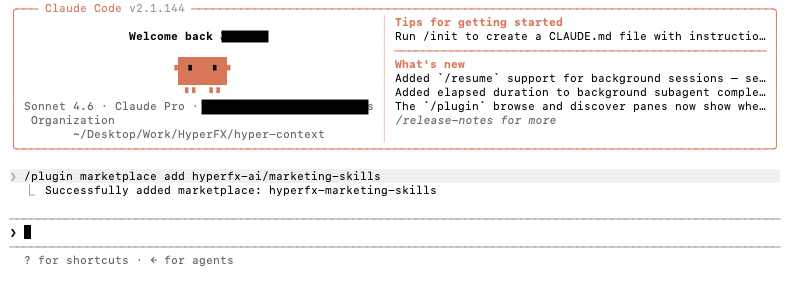
In Claude Code, run:
```bash theme={null}
/plugin marketplace add hyperfx-ai/marketing-skills
```
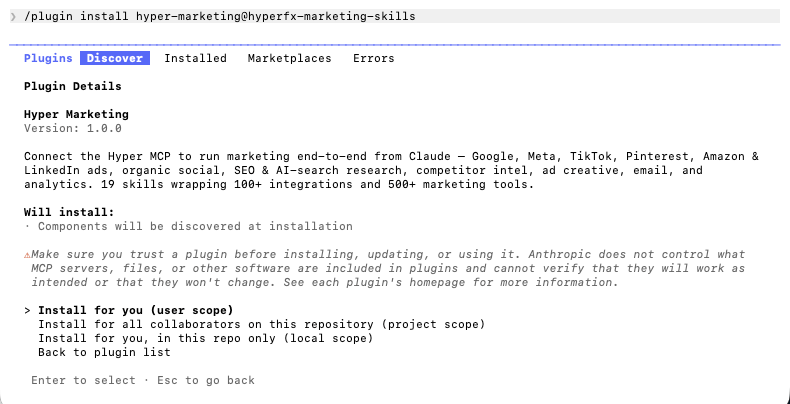
 Install the marketing plugin:
```bash theme={null}
/plugin install hyper-marketing@hyperfx-marketing-skills
```
When prompted, choose an install scope:
* **User scope** — available in all your projects (recommended)
* **Project scope** — shared with collaborators on this repo
* **Local scope** — only this repo, only for you
Install the marketing plugin:
```bash theme={null}
/plugin install hyper-marketing@hyperfx-marketing-skills
```
When prompted, choose an install scope:
* **User scope** — available in all your projects (recommended)
* **Project scope** — shared with collaborators on this repo
* **Local scope** — only this repo, only for you
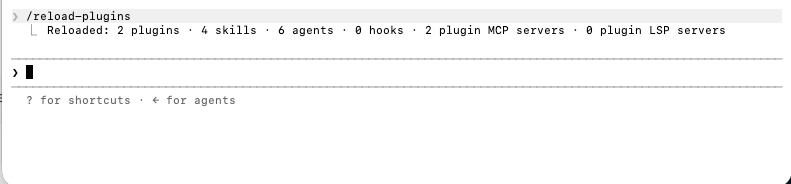
 After install, reload so skills and the MCP server register:
```bash theme={null}
/reload-plugins
```
Or quit and reopen Claude Code.
After install, reload so skills and the MCP server register:
```bash theme={null}
/reload-plugins
```
Or quit and reopen Claude Code.
 The plugin's MCP server needs a one-time OAuth sign-in. Use either path:
**From the plugin manager (recommended):** type `/plugin`, open the **Installed** tab, and select **hyper-marketing** if it shows "needs attention."
The plugin's MCP server needs a one-time OAuth sign-in. Use either path:
**From the plugin manager (recommended):** type `/plugin`, open the **Installed** tab, and select **hyper-marketing** if it shows "needs attention."
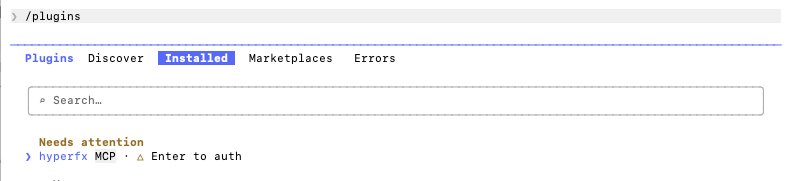 Select the plugin, then choose **Authenticate** on the Hyper MCP server. Your browser opens — sign in to Hyper and authorize access.
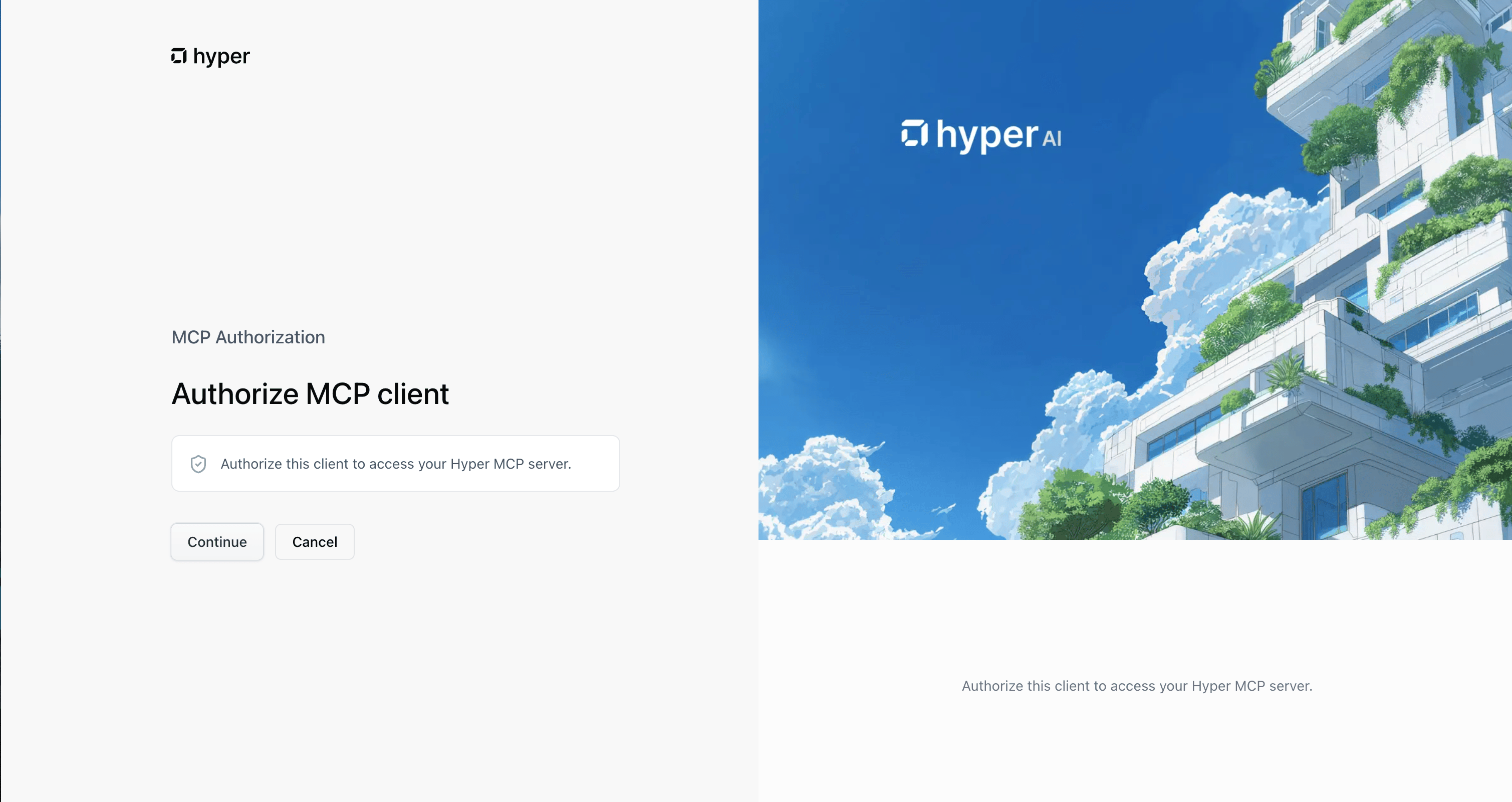 **From `/mcp`:** type `/mcp`, find the Hyper MCP server in the list, select it, then choose **Authenticate**.
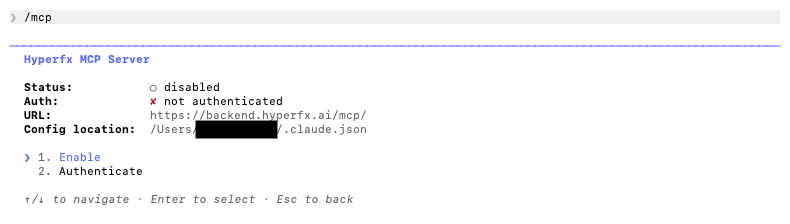 Return to Claude Code — you should see authentication succeed.
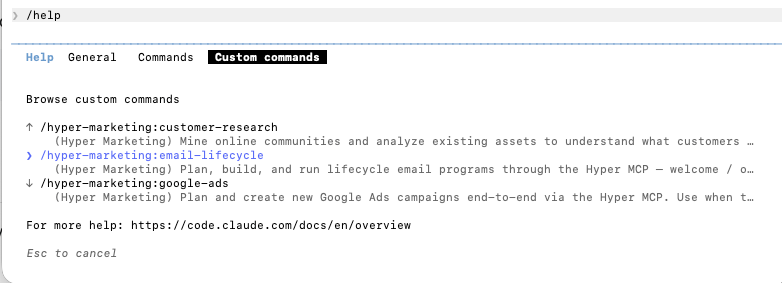
Type `/` in Claude Code and look for skills under the `hyper-marketing` namespace — for example `hyper-marketing:google-ads`, `hyper-marketing:meta-ads`, and `hyper-marketing:seo-research`. You can also open the slash command menu or run `/help` and check the **Commands** tab.
Return to Claude Code — you should see authentication succeed.
Type `/` in Claude Code and look for skills under the `hyper-marketing` namespace — for example `hyper-marketing:google-ads`, `hyper-marketing:meta-ads`, and `hyper-marketing:seo-research`. You can also open the slash command menu or run `/help` and check the **Commands** tab.
 If you prefer to configure the MCP directly without the plugin:
Run this in your terminal (outside a nested Claude session):
```bash theme={null}
claude mcp add hyperfx --transport http https://backend.hyperfx.ai/mcp/
```
Start a Claude Code session (`claude`). You'll be prompted to sign in to Hyper and authorize access — same OAuth flow as the plugin path (see the OAuth screenshot in the plugin install steps above).
The plugin normally installs skills for you. With manual MCP setup, add them yourself:
```bash theme={null}
npx skills add hyperfx-ai/marketing-skills
```
Then run `/reload-plugins` or restart Claude Code.
### Verify your setup
Run a quick test in Claude Code:
```
List my connected Hyper integrations and which marketing skills are available.
```
Claude should call Hyper MCP, show your integration status, and reference skills like `google-ads` or `meta-ads` when relevant.
You're connected. Claude Code can now use Hyper's MCP tools and marketing
skills from the terminal.
## Connect your integrations
Connect the ad platforms and apps your skills need. You can do this in either place:
* **[app.hyperfx.ai/apps](https://app.hyperfx.ai/apps)** — connect accounts (Google Ads, Meta, Gmail, Shopify, and others)
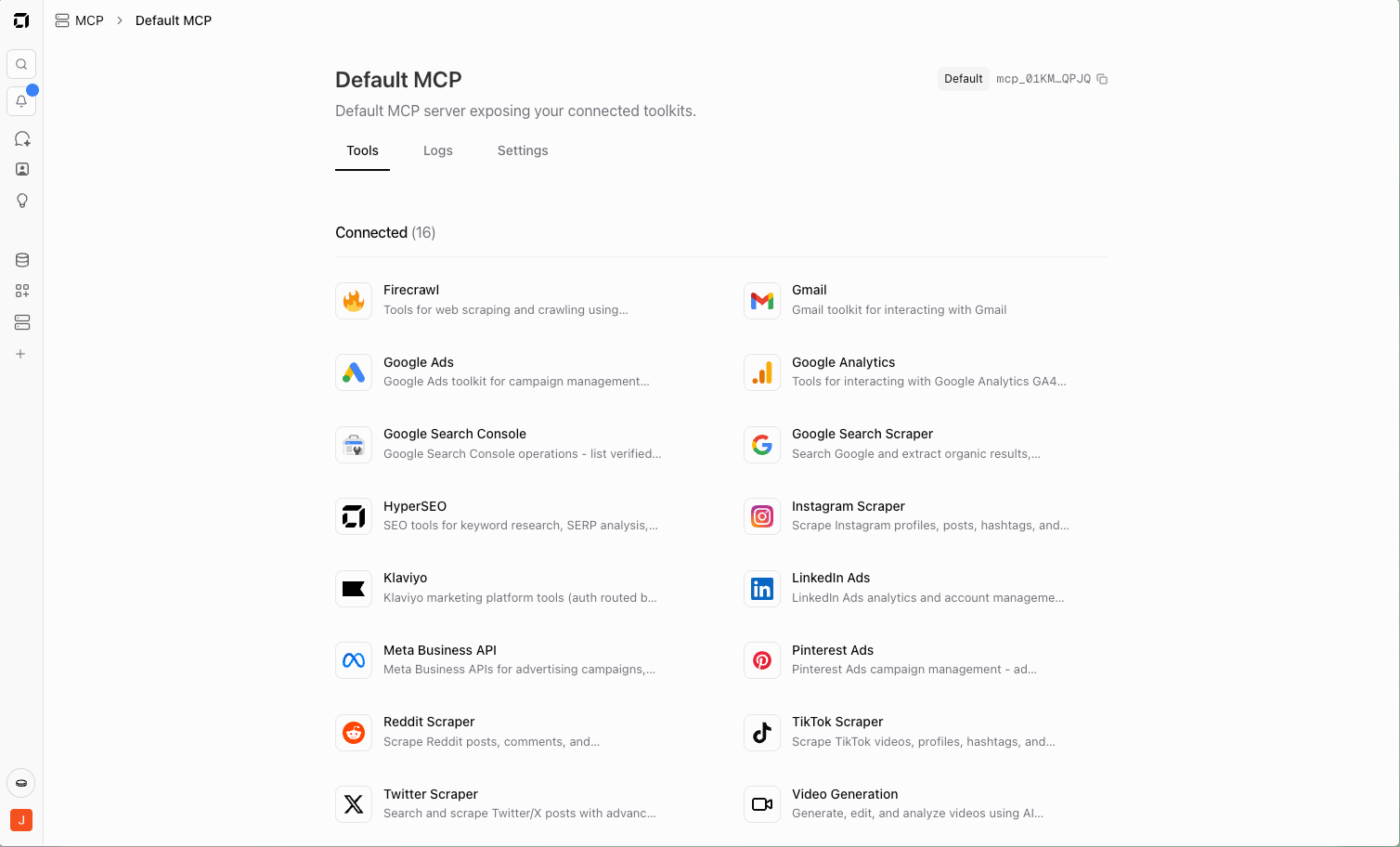
* **[app.hyperfx.ai/mcp](https://app.hyperfx.ai/mcp)** — add the Hyper toolkit to your MCP server and connect integrations from the same page
Most people start at **Apps** to link accounts, then use **MCP** to choose which toolkits and tools Claude Code can access. Each skill declares what it needs at the top — for example, `google-ads` requires Google Ads, and `meta-ads` requires Meta Business.
You can connect integrations at any time. If a skill needs something that isn't connected yet, Claude will tell you which platform to add.
If you prefer to configure the MCP directly without the plugin:
Run this in your terminal (outside a nested Claude session):
```bash theme={null}
claude mcp add hyperfx --transport http https://backend.hyperfx.ai/mcp/
```
Start a Claude Code session (`claude`). You'll be prompted to sign in to Hyper and authorize access — same OAuth flow as the plugin path (see the OAuth screenshot in the plugin install steps above).
The plugin normally installs skills for you. With manual MCP setup, add them yourself:
```bash theme={null}
npx skills add hyperfx-ai/marketing-skills
```
Then run `/reload-plugins` or restart Claude Code.
### Verify your setup
Run a quick test in Claude Code:
```
List my connected Hyper integrations and which marketing skills are available.
```
Claude should call Hyper MCP, show your integration status, and reference skills like `google-ads` or `meta-ads` when relevant.
You're connected. Claude Code can now use Hyper's MCP tools and marketing
skills from the terminal.
## Connect your integrations
Connect the ad platforms and apps your skills need. You can do this in either place:
* **[app.hyperfx.ai/apps](https://app.hyperfx.ai/apps)** — connect accounts (Google Ads, Meta, Gmail, Shopify, and others)
* **[app.hyperfx.ai/mcp](https://app.hyperfx.ai/mcp)** — add the Hyper toolkit to your MCP server and connect integrations from the same page
Most people start at **Apps** to link accounts, then use **MCP** to choose which toolkits and tools Claude Code can access. Each skill declares what it needs at the top — for example, `google-ads` requires Google Ads, and `meta-ads` requires Meta Business.
You can connect integrations at any time. If a skill needs something that isn't connected yet, Claude will tell you which platform to add.
 ## Available skills
Skills activate automatically from natural language, or invoke one directly (e.g. `/hyper-marketing:google-ads`).
| Skill | What it does |
| ------------------------ | --------------------------------------------------------------------- |
| `google-ads` | Plan and launch Search, Display, and Performance Max campaigns |
| `meta-ads` | Plan and launch Facebook and Instagram campaigns |
| `tiktok-ads` | Plan and launch TikTok campaigns across all objectives |
| `amazon-ads` | Plan and launch Amazon Sponsored Products campaigns |
| `pinterest-ads` | Plan and launch Pinterest campaigns |
| `meta-ads-library` | Research competitor ads in the Meta Ads Library |
| `instagram` | Publish posts, Reels, Stories, and carousels |
| `tiktok` | Publish videos, photos, and carousels |
| `linkedin` | Publish posts and carousels to personal profiles and company pages |
| `seo-research` | Keyword research, SERP analysis, AI search visibility, site audits |
| `competitor-intel` | Weekly competitor digests, battle cards, site and social monitoring |
| `customer-research` | VOC research from Reddit, YouTube, TikTok, Twitter, and G2 |
| `ad-creative-generation` | Generate on-brand ad copy and images |
| `image-generation` | Generate and edit images for any placement |
| `video-generation` | AI video generation, captions, voiceover, and editing |
| `cold-email-outreach` | Prospect, enrich, personalize, and send cold email sequences |
| `email-lifecycle` | Build welcome, nurture, and re-engagement email programs |
| `analytics-insights` | GA4, GTM, Search Console, and BigQuery from chat |
| `youtube-transcript` | Turn any YouTube video into blog posts, show notes, or social content |
## What you can do
Once connected, Claude Code can run full marketing workflows through Hyper — not just single tools:
1. **Paid campaigns** — Set up, launch, and optimize across Meta, Google Ads, TikTok, and Amazon (creatives, targeting, keywords, budgets, tracking, monitoring).
2. **Market research** — Find winning angles via Meta Ads Library, Reddit, Instagram, TikTok, YouTube, and competitor sites (hooks, offers, pain points, creative trends).
3. **SEO & content** — Connect WordPress, Webflow, Wix, or Ghost, then improve SEO and AI search visibility with keyword research, content briefs, automated posts, and performance tracking.
4. **Organic social** — Create and schedule posts across Instagram, TikTok, LinkedIn, Reddit, Pinterest, and X using brand voice, trend research, and generated images or video.
5. **Ecommerce analytics** — Connect Shopify, GA4, Search Console, Meta, Google Ads, and TikTok to analyze store performance, find conversion issues, and recommend campaigns, landing pages, and budget shifts.
## Example prompts
Copy these into Claude Code as-is, then swap in your brand, URLs, and numbers. The more context you give, the better the skill routing and output. Each example maps to one of the workflows above.
### Google Search campaign
```
Plan and Launch a Google Search campaign for my B2B SaaS product:
- Product: project management tool for remote teams
- Site: https://example.com
- Audience: team leads and ops managers at companies with 20–200 employees
- Budget: $75/day
- Geo: US and Canada
Before creating anything:
1. Research keywords with real search volume and CPC estimates
2. Group keywords by intent (branded, competitor, feature-based, problem-aware)
3. Propose 2 ad groups with 3 responsive search ads each
4. List negative keywords to add on day one
Pause all campaigns until I approve the structure and copy.
```
Claude should pull keyword data through Hyper, draft ad groups and RSAs, and leave campaigns paused for your review.
### Meta competitor creative research
```
Use the Meta Ads Library to research competitors in the DTC skincare space:
- Keywords: "anti-aging serum", "retinol", "vitamin C serum"
- Countries: US
- Pull the last 50 active ads across the top 5 advertisers by volume
- For each advertiser, summarize: primary hooks, offer types (discount vs bundle vs free shipping), creative format mix (static vs video vs carousel), and how long ads have been running
End with 5 creative angles we should test, grounded in what's working in the library.
```
### SEO audit with priorities
```
Run an SEO audit on https://example.com:
- Focus on commercial pages (pricing, product, comparisons)
- Pull top keyword opportunities we're not ranking for yet
- Flag technical issues that block crawling or indexing
- Check AI search visibility (how we're cited in AI Overviews / chat-style results if data is available)
Deliver a prioritized action list: quick wins this week, medium effort this month, and larger projects. Estimate impact where you can.
```
### Organic social content across channels
```
Create and schedule a week of organic social content for my DTC skincare brand:
- Brand voice: clean, science-backed, approachable — never alarmist or overly salesy
- Core message: "gentle retinol that works for sensitive skin"
- Site: https://example.com
Before writing anything:
1. Research what's trending on TikTok, Instagram, Reddit, and X around retinol, sensitive skin, and night routines — note hooks and formats that are getting engagement
2. Pull competitor or category posts if useful for angle ideas (don't copy)
Then build platform-native content for the week (Mon–Fri):
- **Instagram** — 1 Reel concept + 1 carousel (5 slides)
- **TikTok** — 1 short video script (15–30 sec) with on-screen text beats
- **LinkedIn** — 1 thought-leadership post for our founder (plain text + optional doc/carousel outline)
- **Reddit** — 1 value-first post draft for r/SkincareAddiction (no hard sell; follow sub rules)
- **Pinterest** — 2 pin concepts with titles, descriptions, and image prompts
- **X** — 3 posts (mix of tip thread + product mention + engagement question)
For each piece: full copy, hashtags where appropriate, suggested post time, and image or video generation prompts (or generate assets if those tools are connected).
Do not publish or schedule anything — deliver a review doc I can approve platform by platform.
```
Claude should route through organic social skills (`instagram`, `tiktok`, `linkedin`, etc.) plus `image-generation` or `video-generation` for assets, and research skills for trend discovery.
### Ecommerce performance and budget review
```
Audit my Shopify store performance for the last 30 days and recommend what to change in paid media:
- Store: https://example.myshopify.com
- Pull GA4: sessions, add-to-cart, purchases, and revenue by channel (organic, paid social, paid search, email, direct)
- Compare to the prior 30 days — flag any channel where conversion rate dropped more than 15%
- If Meta and Google Ads are connected, summarize spend, ROAS, and CPA by campaign
- Identify top landing pages with high traffic but low purchase rate
End with a prioritized list: budget shifts, campaign pauses, and 3 landing-page tests. Pause or reduce spend recommendations only — don't change live budgets without my approval.
```
Claude should use `analytics-insights` plus ad platform skills when those integrations are connected.
### Cross-channel marketing agent
```
Build a marketing agent on Hyper called "Claude Code Test Agent":
- Scope: own weekly performance reporting and competitor monitoring
- Assign tasks for Monday performance digest and Friday competitor scan
- Attach skills for analytics-insights and competitor-intel
- Use tools appropriate for GA4, Google Ads, and Meta if those integrations are connected
Show me what you created and link to it in Hyper when done.
```
## Troubleshooting
You asked Claude to run `/plugin` or `/mcp` instead of typing it yourself. Slash commands must go directly into the Claude Code input — not through a prompt to the model.
Run `/reload-plugins`, or restart Claude Code. Then type `/` and look for the `hyper-marketing:` namespace, or run `/help` and check the **Commands** tab.
If skills are still missing, confirm the plugin is enabled: `/plugin` → **Installed** tab → **hyper-marketing**.
Open `/plugin` → **Installed** → **hyper-marketing** → **Authenticate**, or use `/mcp` → select the Hyper server → **Authenticate**.
If the browser flow fails, try a private window or disable ad blockers temporarily. You can also reconnect from [app.hyperfx.ai/mcp](https://app.hyperfx.ai/mcp).
Run `/plugin list` to confirm `hyper-marketing` is enabled. Re-authenticate the Hyper MCP server via `/mcp` or the **Installed** tab in `/plugin`.
Connect the platform at [app.hyperfx.ai/apps](https://app.hyperfx.ai/apps), or from [app.hyperfx.ai/mcp](https://app.hyperfx.ai/mcp) if you're managing connections there. Each skill lists required integrations at the top of its instructions.
Check your MCP config:
```bash theme={null}
cat ~/.claude/mcp.json
```
You should see a `hyperfx` entry pointing at `https://backend.hyperfx.ai/mcp/`. Re-run the `claude mcp add` command if it's missing.
## FAQ
No. MCP is the connection layer — you talk to Claude in plain language. The plugin configures the Hyper MCP server for you.
[Connect to Claude](/docs/mcp/connect-claude) covers Claude's chat app (connectors UI). This page is for **Claude Code** — the terminal CLI with plugins, slash commands, and project-scoped skills.
Pick one path to avoid duplicate MCP entries. The plugin is recommended — it installs skills and keeps the MCP config in sync.
Type the skill path in Claude Code, for example `/hyper-marketing:google-ads`, then describe what you want. You can also just ask in natural language; Claude routes to the right skill when the task matches.
## Related resources
* [Marketing skills repository](https://github.com/hyperfx-ai/marketing-skills) — plugin marketplace source, skill definitions, and [other install options](https://github.com/hyperfx-ai/marketing-skills#other-install-options) for manual MCP setup
* [Connect to Claude (desktop)](/docs/mcp/connect-claude) — connect Hyper MCP in Claude's chat app via connectors
* [Set up your MCP server](/docs/mcp/setup) — choose toolkits, set per-tool guardrails, and control what Claude Code can access
* [Integrations overview](/docs/integrations/overview) — full list of platforms you can connect in Hyper
* [Claude Code documentation](https://code.claude.com/docs) — official CLI reference, plugins, and slash commands
## Available skills
Skills activate automatically from natural language, or invoke one directly (e.g. `/hyper-marketing:google-ads`).
| Skill | What it does |
| ------------------------ | --------------------------------------------------------------------- |
| `google-ads` | Plan and launch Search, Display, and Performance Max campaigns |
| `meta-ads` | Plan and launch Facebook and Instagram campaigns |
| `tiktok-ads` | Plan and launch TikTok campaigns across all objectives |
| `amazon-ads` | Plan and launch Amazon Sponsored Products campaigns |
| `pinterest-ads` | Plan and launch Pinterest campaigns |
| `meta-ads-library` | Research competitor ads in the Meta Ads Library |
| `instagram` | Publish posts, Reels, Stories, and carousels |
| `tiktok` | Publish videos, photos, and carousels |
| `linkedin` | Publish posts and carousels to personal profiles and company pages |
| `seo-research` | Keyword research, SERP analysis, AI search visibility, site audits |
| `competitor-intel` | Weekly competitor digests, battle cards, site and social monitoring |
| `customer-research` | VOC research from Reddit, YouTube, TikTok, Twitter, and G2 |
| `ad-creative-generation` | Generate on-brand ad copy and images |
| `image-generation` | Generate and edit images for any placement |
| `video-generation` | AI video generation, captions, voiceover, and editing |
| `cold-email-outreach` | Prospect, enrich, personalize, and send cold email sequences |
| `email-lifecycle` | Build welcome, nurture, and re-engagement email programs |
| `analytics-insights` | GA4, GTM, Search Console, and BigQuery from chat |
| `youtube-transcript` | Turn any YouTube video into blog posts, show notes, or social content |
## What you can do
Once connected, Claude Code can run full marketing workflows through Hyper — not just single tools:
1. **Paid campaigns** — Set up, launch, and optimize across Meta, Google Ads, TikTok, and Amazon (creatives, targeting, keywords, budgets, tracking, monitoring).
2. **Market research** — Find winning angles via Meta Ads Library, Reddit, Instagram, TikTok, YouTube, and competitor sites (hooks, offers, pain points, creative trends).
3. **SEO & content** — Connect WordPress, Webflow, Wix, or Ghost, then improve SEO and AI search visibility with keyword research, content briefs, automated posts, and performance tracking.
4. **Organic social** — Create and schedule posts across Instagram, TikTok, LinkedIn, Reddit, Pinterest, and X using brand voice, trend research, and generated images or video.
5. **Ecommerce analytics** — Connect Shopify, GA4, Search Console, Meta, Google Ads, and TikTok to analyze store performance, find conversion issues, and recommend campaigns, landing pages, and budget shifts.
## Example prompts
Copy these into Claude Code as-is, then swap in your brand, URLs, and numbers. The more context you give, the better the skill routing and output. Each example maps to one of the workflows above.
### Google Search campaign
```
Plan and Launch a Google Search campaign for my B2B SaaS product:
- Product: project management tool for remote teams
- Site: https://example.com
- Audience: team leads and ops managers at companies with 20–200 employees
- Budget: $75/day
- Geo: US and Canada
Before creating anything:
1. Research keywords with real search volume and CPC estimates
2. Group keywords by intent (branded, competitor, feature-based, problem-aware)
3. Propose 2 ad groups with 3 responsive search ads each
4. List negative keywords to add on day one
Pause all campaigns until I approve the structure and copy.
```
Claude should pull keyword data through Hyper, draft ad groups and RSAs, and leave campaigns paused for your review.
### Meta competitor creative research
```
Use the Meta Ads Library to research competitors in the DTC skincare space:
- Keywords: "anti-aging serum", "retinol", "vitamin C serum"
- Countries: US
- Pull the last 50 active ads across the top 5 advertisers by volume
- For each advertiser, summarize: primary hooks, offer types (discount vs bundle vs free shipping), creative format mix (static vs video vs carousel), and how long ads have been running
End with 5 creative angles we should test, grounded in what's working in the library.
```
### SEO audit with priorities
```
Run an SEO audit on https://example.com:
- Focus on commercial pages (pricing, product, comparisons)
- Pull top keyword opportunities we're not ranking for yet
- Flag technical issues that block crawling or indexing
- Check AI search visibility (how we're cited in AI Overviews / chat-style results if data is available)
Deliver a prioritized action list: quick wins this week, medium effort this month, and larger projects. Estimate impact where you can.
```
### Organic social content across channels
```
Create and schedule a week of organic social content for my DTC skincare brand:
- Brand voice: clean, science-backed, approachable — never alarmist or overly salesy
- Core message: "gentle retinol that works for sensitive skin"
- Site: https://example.com
Before writing anything:
1. Research what's trending on TikTok, Instagram, Reddit, and X around retinol, sensitive skin, and night routines — note hooks and formats that are getting engagement
2. Pull competitor or category posts if useful for angle ideas (don't copy)
Then build platform-native content for the week (Mon–Fri):
- **Instagram** — 1 Reel concept + 1 carousel (5 slides)
- **TikTok** — 1 short video script (15–30 sec) with on-screen text beats
- **LinkedIn** — 1 thought-leadership post for our founder (plain text + optional doc/carousel outline)
- **Reddit** — 1 value-first post draft for r/SkincareAddiction (no hard sell; follow sub rules)
- **Pinterest** — 2 pin concepts with titles, descriptions, and image prompts
- **X** — 3 posts (mix of tip thread + product mention + engagement question)
For each piece: full copy, hashtags where appropriate, suggested post time, and image or video generation prompts (or generate assets if those tools are connected).
Do not publish or schedule anything — deliver a review doc I can approve platform by platform.
```
Claude should route through organic social skills (`instagram`, `tiktok`, `linkedin`, etc.) plus `image-generation` or `video-generation` for assets, and research skills for trend discovery.
### Ecommerce performance and budget review
```
Audit my Shopify store performance for the last 30 days and recommend what to change in paid media:
- Store: https://example.myshopify.com
- Pull GA4: sessions, add-to-cart, purchases, and revenue by channel (organic, paid social, paid search, email, direct)
- Compare to the prior 30 days — flag any channel where conversion rate dropped more than 15%
- If Meta and Google Ads are connected, summarize spend, ROAS, and CPA by campaign
- Identify top landing pages with high traffic but low purchase rate
End with a prioritized list: budget shifts, campaign pauses, and 3 landing-page tests. Pause or reduce spend recommendations only — don't change live budgets without my approval.
```
Claude should use `analytics-insights` plus ad platform skills when those integrations are connected.
### Cross-channel marketing agent
```
Build a marketing agent on Hyper called "Claude Code Test Agent":
- Scope: own weekly performance reporting and competitor monitoring
- Assign tasks for Monday performance digest and Friday competitor scan
- Attach skills for analytics-insights and competitor-intel
- Use tools appropriate for GA4, Google Ads, and Meta if those integrations are connected
Show me what you created and link to it in Hyper when done.
```
## Troubleshooting
You asked Claude to run `/plugin` or `/mcp` instead of typing it yourself. Slash commands must go directly into the Claude Code input — not through a prompt to the model.
Run `/reload-plugins`, or restart Claude Code. Then type `/` and look for the `hyper-marketing:` namespace, or run `/help` and check the **Commands** tab.
If skills are still missing, confirm the plugin is enabled: `/plugin` → **Installed** tab → **hyper-marketing**.
Open `/plugin` → **Installed** → **hyper-marketing** → **Authenticate**, or use `/mcp` → select the Hyper server → **Authenticate**.
If the browser flow fails, try a private window or disable ad blockers temporarily. You can also reconnect from [app.hyperfx.ai/mcp](https://app.hyperfx.ai/mcp).
Run `/plugin list` to confirm `hyper-marketing` is enabled. Re-authenticate the Hyper MCP server via `/mcp` or the **Installed** tab in `/plugin`.
Connect the platform at [app.hyperfx.ai/apps](https://app.hyperfx.ai/apps), or from [app.hyperfx.ai/mcp](https://app.hyperfx.ai/mcp) if you're managing connections there. Each skill lists required integrations at the top of its instructions.
Check your MCP config:
```bash theme={null}
cat ~/.claude/mcp.json
```
You should see a `hyperfx` entry pointing at `https://backend.hyperfx.ai/mcp/`. Re-run the `claude mcp add` command if it's missing.
## FAQ
No. MCP is the connection layer — you talk to Claude in plain language. The plugin configures the Hyper MCP server for you.
[Connect to Claude](/docs/mcp/connect-claude) covers Claude's chat app (connectors UI). This page is for **Claude Code** — the terminal CLI with plugins, slash commands, and project-scoped skills.
Pick one path to avoid duplicate MCP entries. The plugin is recommended — it installs skills and keeps the MCP config in sync.
Type the skill path in Claude Code, for example `/hyper-marketing:google-ads`, then describe what you want. You can also just ask in natural language; Claude routes to the right skill when the task matches.
## Related resources
* [Marketing skills repository](https://github.com/hyperfx-ai/marketing-skills) — plugin marketplace source, skill definitions, and [other install options](https://github.com/hyperfx-ai/marketing-skills#other-install-options) for manual MCP setup
* [Connect to Claude (desktop)](/docs/mcp/connect-claude) — connect Hyper MCP in Claude's chat app via connectors
* [Set up your MCP server](/docs/mcp/setup) — choose toolkits, set per-tool guardrails, and control what Claude Code can access
* [Integrations overview](/docs/integrations/overview) — full list of platforms you can connect in Hyper
* [Claude Code documentation](https://code.claude.com/docs) — official CLI reference, plugins, and slash commands